
Docs
Points for interactions
How to set up a points account, accrue points for an interaction through a decision table, redeem them on a purchase and adjust a balance by hand.
By the end you'll have your own points account: the CRM accrues points for interactions of the type you choose, an app redeems them on a purchase, and a manager can adjust a balance by hand. The Nordtone example is “Stars”: 5 stars for a promoter consultation, at most once a day, which customers can spend on part of a purchase. The account, the accrual table and redemption are set up by a role with the “Settings → All settings, users and roles” permission — only the system “Administrator” role has it.
What you need
- The “Settings → All settings, users and roles” permission — for the table, the account kind and the interaction type.
- The “Decision table rows → Edit and import” permission — for the table row.
- The “Accounts → Manual entries and reversals” permission — for a manual entry. The “Administrator” and “Operator” roles have it.
- An interaction type that earns points — at Nordtone it's “Consultation” — and a type that spends them, “Purchase”. Interaction types are described under Entity types.
Points are accrued by a decision table: the CRM evaluates it for the customer on every new interaction of the chosen type and takes the amount from the first matching row. So the table comes first, then the account kind.
Accrual table
- Open Settings → Table definitions and press New table.
- Enter
tour_starsin Code, and in Name enter “Звёзды за консультацию” in Russian and “Stars for a consultation” in English. - Don't add request parameters or columns: a table without columns returns all its rows.
- In the Result schema block, fill in the placeholder field: enter
amountas the Field code, choose the Integer type and tick Required. The CRM takes the accrual amount from this field. - Press Create table. The table definition opens — the table is created disabled.
- Press Enable and confirm.
Now the row: it sets the amount and the limit.
- Open Data → Decision tables, then the “Stars for a consultation” table, and press New row.
- Enter
visitin Code and leave the priority as it is. - In the Result block, enter 5 in the
amountfield. - In the Per-customer limits block, enter 1 in Per day — at most one accrual per customer a day.
- Press Create row.
The accrual looks for the first matching row whose limit isn't used up; if there is none, no points are accrued. To
accrue only for an effective consultation, a parameter alone is not enough: give the table a parameter of type “String” or
“Option” and a key column on it, put effective in the row's cell, and set the
parameter's source to “Result” in the account kind's accrual settings (request
parameters). Without the column, the parameter selects no rows. Set the source
right after changing the table: while the parameter has none, the account kind accrues nothing. Rows can also be loaded
from a file.
Account kind
- Open Settings → Entity types, the Account kinds tab, and press New type.
- Enter
starsin Code, and in Label enter “Звёзды” in Russian and “Stars” in English. - In the Unit block, enter “звезда” in Russian and “star” in English, and in the Plural forms block — “звезда”, “звезды”, “звёзд” and “star”, “stars”.
- Leave Decimal places at 0 — stars are whole. Don't tick Negative balance allowed: that way a redemption can't exceed the balance.
- In the Accrual by a decision table block, choose “Stars for a consultation” as the Accrual table and tick “Consultation” in the Interaction types to accrue for list. A table without parameters needs no sources.
- Press Create type.
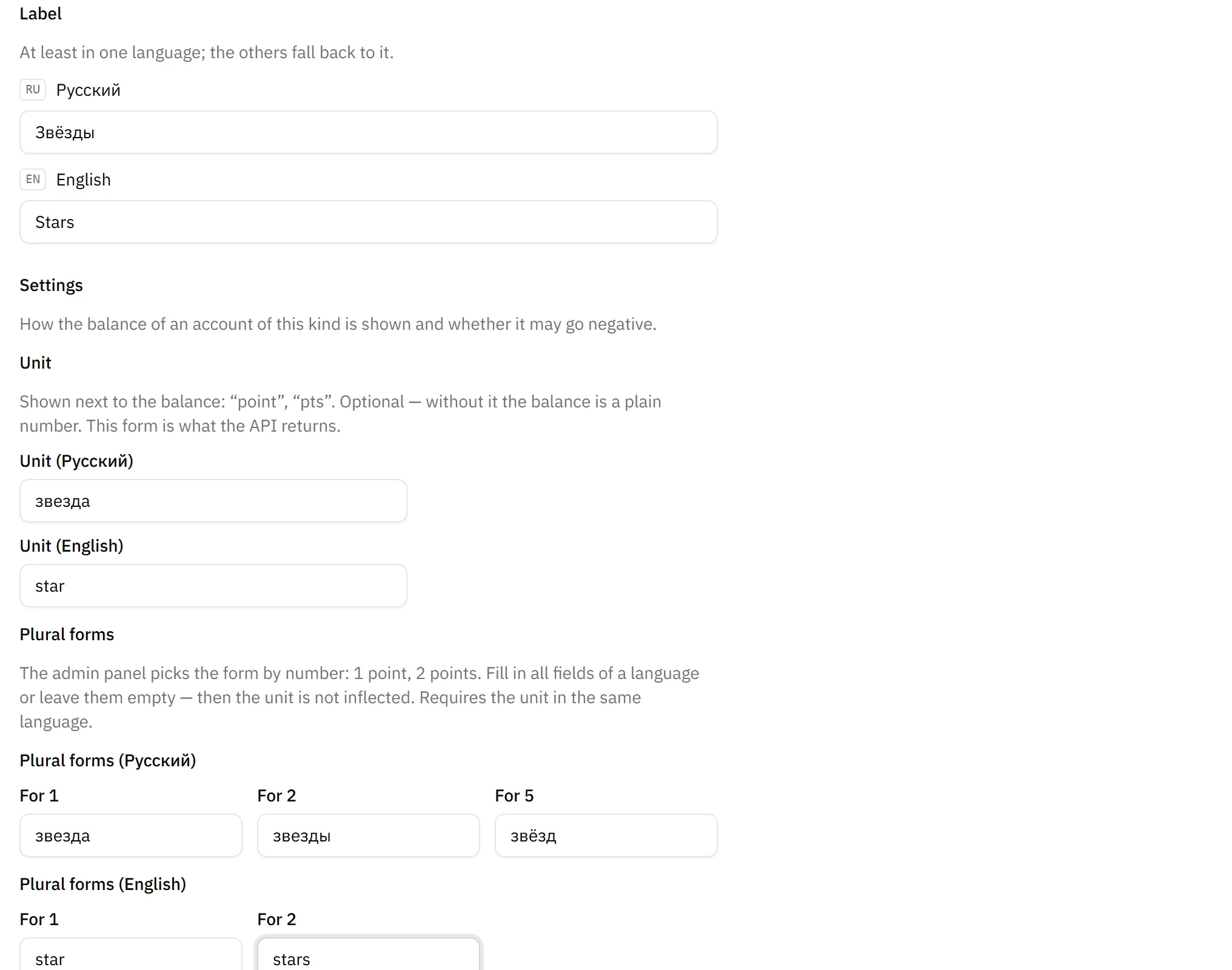
The CRM checks that the table's result schema has a required amount field and that the row amounts fit the account:
whole and positive. The kind's code can't be changed after creation. All account kind settings are described under
Entity types.
Redeeming on a purchase
- Under Settings → Entity types, open the Interaction types tab and the “Purchase” type — the link in the list is its code
purchase. - In the Account kinds for redemption block, tick “Stars”.
- Press Save.
Points are redeemed by an app — a till or the promoter app: in the purchase request it gives the account kind, the
amount and a reason (ledger in POST /interactions, see the API documentation). If the balance
isn't enough, the whole purchase is refused with INSUFFICIENT_BALANCE. The redemption is posted before the accrual of
the same purchase, so points earned by a purchase can't pay for that purchase.
Manual entry
A manual entry adjusts a balance without an interaction — for example, to make up for a consultation the promoter couldn't record.
- Open a customer card — say, Anna Lange's — and the Accounts tab.
- Press Post entry.
- In Account kind, choose “Stars”.
- In Amount, enter 10 — a plus credits, a minus debits.
- In Reason, enter “Make-up for an unrecorded consultation”.
- Press Post.
The Post entry button is shown for an active customer. The CRM won't post a debit larger than the balance and shows “Insufficient balance…” under the amount. To cancel a mistaken manual entry, press Reverse in its row, give a reason in the dialog and press Reverse again. Interaction entries can't be cancelled this way — a void of the interaction rolls them back.
Check the result
- Accrual. Under Data → Decision tables, open “Stars for a consultation”, press Evaluate, pick a
customer and press Evaluate in the panel. The
visitrow appears under “Matched” with an amount of 5 and a limit of “0 of 1 used”. The evaluation accrues nothing — see Evaluate for a customer. - Balance. The card's Accounts tab shows a “Stars” balance of 10 stars after the manual entry, and the entry list has a “Manual” row with the reason and the author.
- Accrual for a consultation. Once an app records a consultation, the same tab shows an “Accrual” entry of +5 with
links to the interaction and to the
visitrow. A second consultation on the same day earns nothing: the row's limit is used up.
What's next
- A decision table with a limit — per-campaign limits and customer conditions.
- Merging duplicates — what happens to balances when two customers turn out to be one.
- Voiding an interaction — it cancels both the interaction's accrual and its redemption.
- Apps read balances and entries through the API; they can post a manual entry too.