
Docs
Export log
Every export of the organization in one log — who exported what, when and with which filter.
The Export log shows every file export run by the organization's users: who, when, which section, with which filter and which columns. The log is there to audit access to personal data — you can see who took which customer data out of the CRM.
The section is in the Settings menu. Roles with the “Settings → All settings, users and roles” permission (only the system “Administrator” role has it) can see it. Each user sees and downloads their own files on the My exports page.
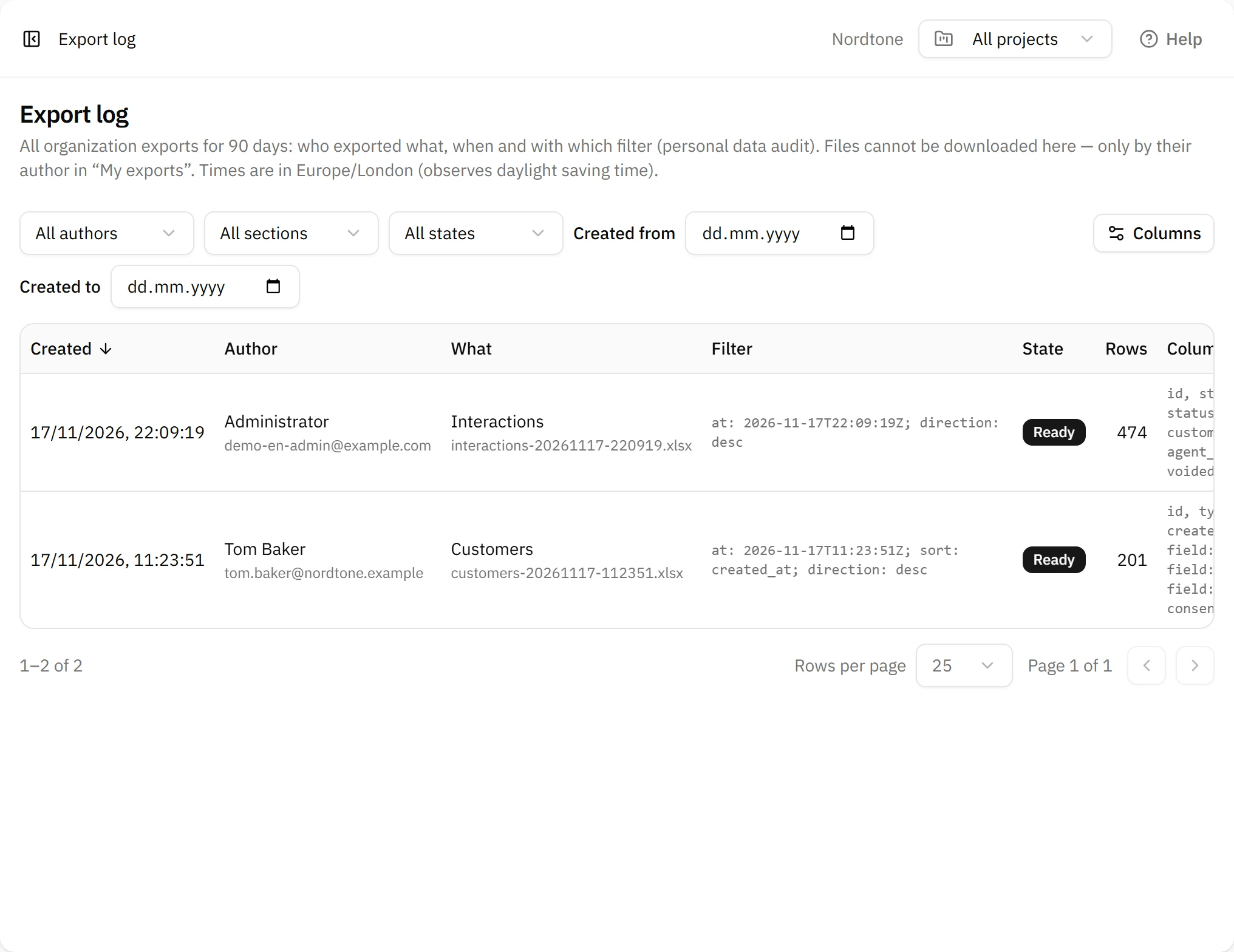
What's on the screen
The log columns:
- Created — when the export was started. Newest first;
- Author — the user's name and e-mail. If the user has since been deleted, you see “User deleted” and their id instead;
- What — the section (customers, interactions, decision table rows, catalog, agents) and the file name;
- Filter — the parameters the export ran with, such as the sort order and its direction; “—” means no parameters;
- State — the same states as in My exports; a failed export shows the reason under its state;
- Rows — how many rows went into the file;
- Columns — the codes of the columns that went into the file. Columns depend on the author's role: only the ones visible to it are exported.
Times are in the organization's time zone.
Filters
- All authors — exports of one user of the organization;
- All sections — exports of one section;
- All states — “Queued”, “Exporting”, “Ready” or “Failed”;
- Created from and Created to — a period by day.
Filters are kept in the page address, so you can send a colleague a link to the exports you found.
No downloads
The log shows what was exported but doesn't hand out the files — not even to an administrator. Only the author downloads a file, on the My exports page, until the file's retention period runs out (7 days by default).
Retention
Log entries are kept for 90 days (the default), then deleted. The exact period is shown under the section title. An entry outlives the file itself: after the file is deleted on expiry, the log still shows who exported what.