
Docs
Roles
Permission sets and project scope — system roles, a custom role from scratch or as a copy, the permission matrix and the archive.
A role sets what a user sees and can do in the admin panel: a set of permissions and a project scope. Each user has one role. The Roles section is open to the “Administrator” role only: it is the only role with the “Settings → All settings, users and roles” permission. Roles are assigned in Users.
What's on the screen
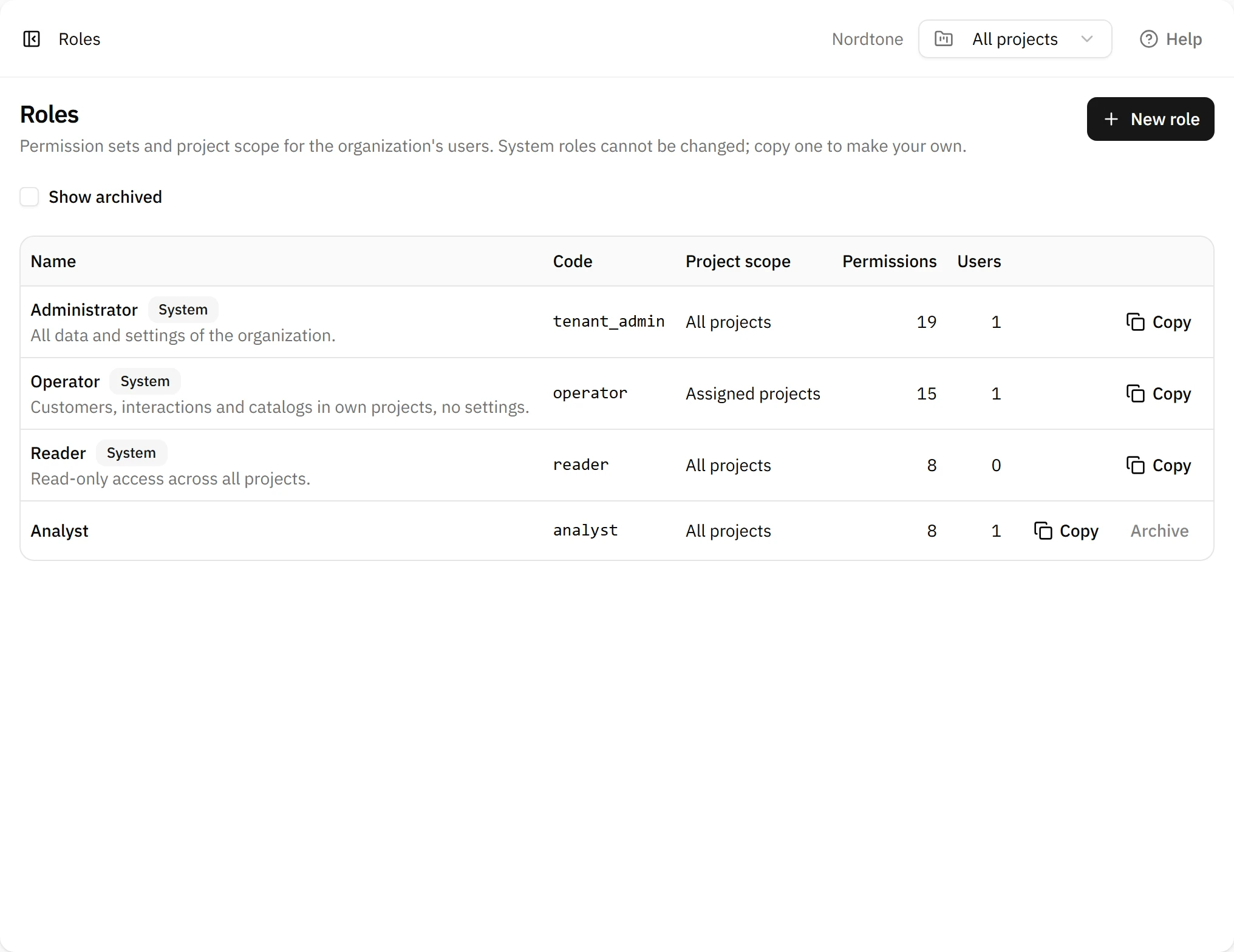
The list columns are the name with a description, code, project scope, number of permissions and number of users with the role. System roles come first, marked System, followed by the organization's own roles. Archived roles are added to the list by the Show archived checkbox. A role's row has a Copy button and, for a custom role, Archive. The role name opens its form.
System roles
Every organization has three roles whose permissions and scope come from the platform:
- Administrator — all data and settings of the organization, every project. Only the administrator has settings, users and roles, customer merge and API log replay.
- Operator — customers, interactions, catalogs, decision table rows, accounts, agents and assets: viewing and writing, no settings. The scope is assigned projects.
- Reader — read-only access across all projects, including the API log.
A system role can't be changed or archived: its form opens read-only. Need a similar role? Make a copy.
Custom role
- Press New role — or Copy in a role's row to start from its permissions and scope.
- Enter the code: a lowercase Latin letter, then Latin letters, digits and single “_”, up to 32 characters — for
example,
analyst. - Enter the name in at least one language.
- Choose the project scope and tick the permissions.
- Press Create role.
You can copy any role, including system and archived ones. Administrator-only permissions are not carried into the copy — the form warns you about it.
Role form
The form of a custom role changes the name, project scope and permissions; the code is shown in the description under the title. Change the fields and press Save. The changes apply to every user with this role.
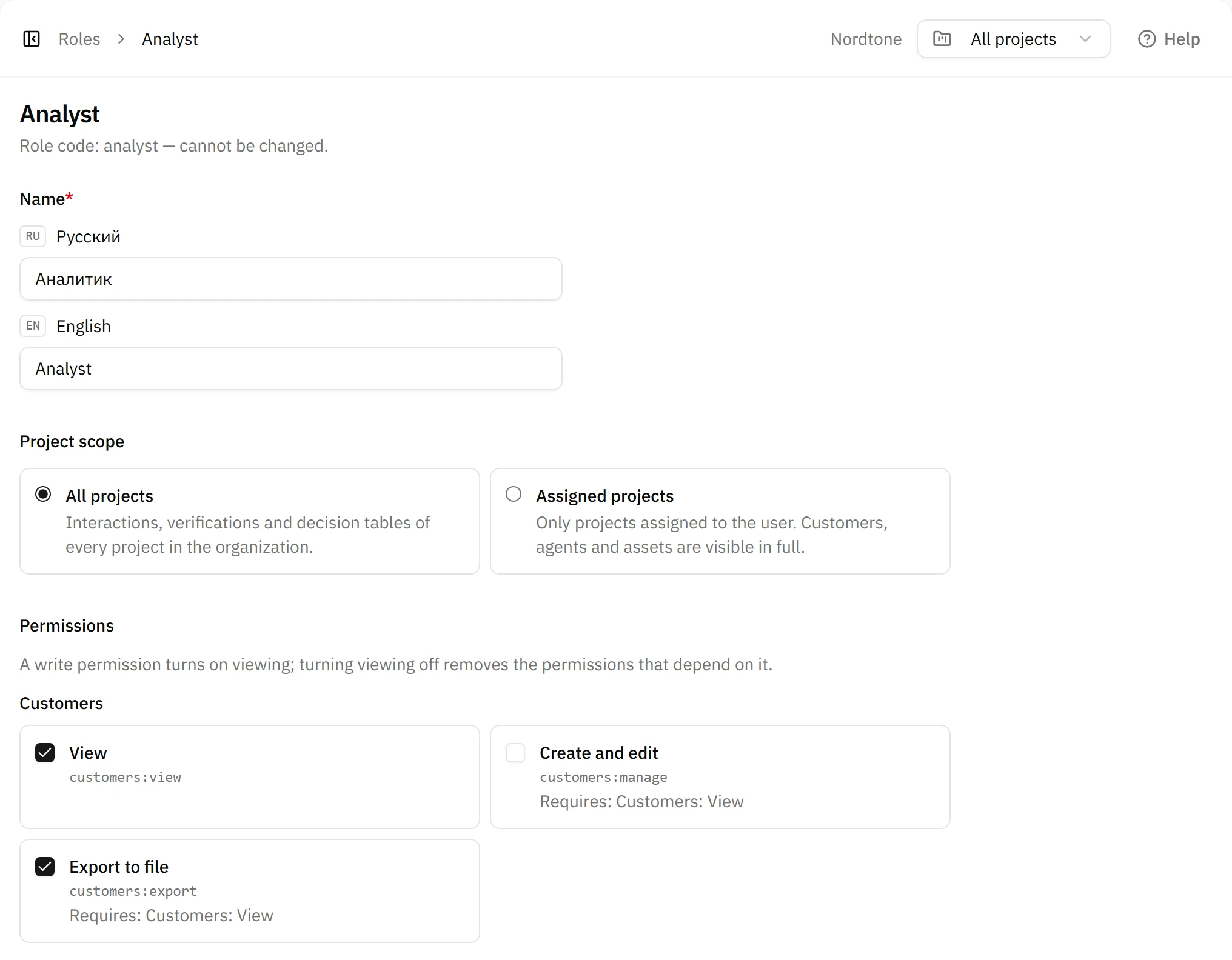
The name is entered in Russian and English: users see it in their interface language.
Project scope
- All projects — interactions, verifications and decision tables of every project in the organization.
- Assigned projects — only the projects assigned to the user in Users. Customers, agents and assets are visible in full.
The scope narrows only data that has a project. If you change the scope of a role that already has users, the form warns you: switching to “Assigned projects” brings the users' earlier assignments back into effect, and switching to “All projects” keeps the assignments but stops applying them.
Permissions
Permissions are grouped by section. Each permission has a label and a code, such as customers:view. The table shows
the permissions of the system roles:
| Group | Permission | Administrator | Operator | Reader |
|---|---|---|---|---|
| Customers | View | yes | yes | yes |
| Customers | Create and edit | yes | yes | |
| Customers | Export to file | yes | yes | |
| Customers | Merge duplicates | yes | ||
| Interactions | View | yes | yes | yes |
| Interactions | Create and edit | yes | yes | |
| Catalogs | View | yes | yes | yes |
| Catalogs | Edit and import | yes | yes | |
| Decision table rows | View | yes | yes | yes |
| Decision table rows | Edit and import | yes | yes | |
| API log | View | yes | yes | |
| API log | Replay a request | yes | ||
| Settings | All settings, users and roles | yes | ||
| Accounts | View | yes | yes | yes |
| Accounts | Manual entries and reversals | yes | yes | |
| Agents | View | yes | yes | yes |
| Agents | Create and edit | yes | yes | |
| Assets | View | yes | yes | yes |
| Assets | Register and change status | yes | yes |
Rules for a custom role:
- A write permission turns on viewing of the same section, and turning viewing off removes the permissions that depend on it. Each permission lists what it requires.
- “Interactions → View”, “API log → View”, customer export and customer merge require “Customers → View”: they show customer data.
- “API log → View” is available only with the “All projects” scope: the log is not split by project.
- Administrator-only permissions — “Settings → All settings, users and roles”, “Customers → Merge duplicates” and “API log → Replay a request” — can't be given to a custom role and are not in its form.
Menu items depend on permissions: a section without the view permission is hidden.
Archive
A custom role you no longer need is archived: roles can't be deleted. Press Archive in the role's row or form and confirm. An archived role can't be assigned or changed, and its code stays taken.