
Docs
Merge customers
How to combine two duplicate customers into one — the preview, what moves to the primary and what stays.
A merge combines two customers who turn out to be the same person: say, Anna Lange signed up in a store with one phone number and in the online store with another. One customer stays as the primary and the other is absorbed: its data moves to the primary. Roles with the “Customers → Merge duplicates” permission can merge customers.
Getting started
- Open the card of the customer who should stay as the primary.
- Press Merge with… in the card header. The Merge customers screen opens.
- In the Customer to absorb field, find the duplicate by phone, document or full name.
The search offers only active customers of the same type. As soon as you pick one, the CRM shows a preview of what will change for the primary customer. If the other customer should stay as the primary, press Swap — the same screen opens from the other customer's side.
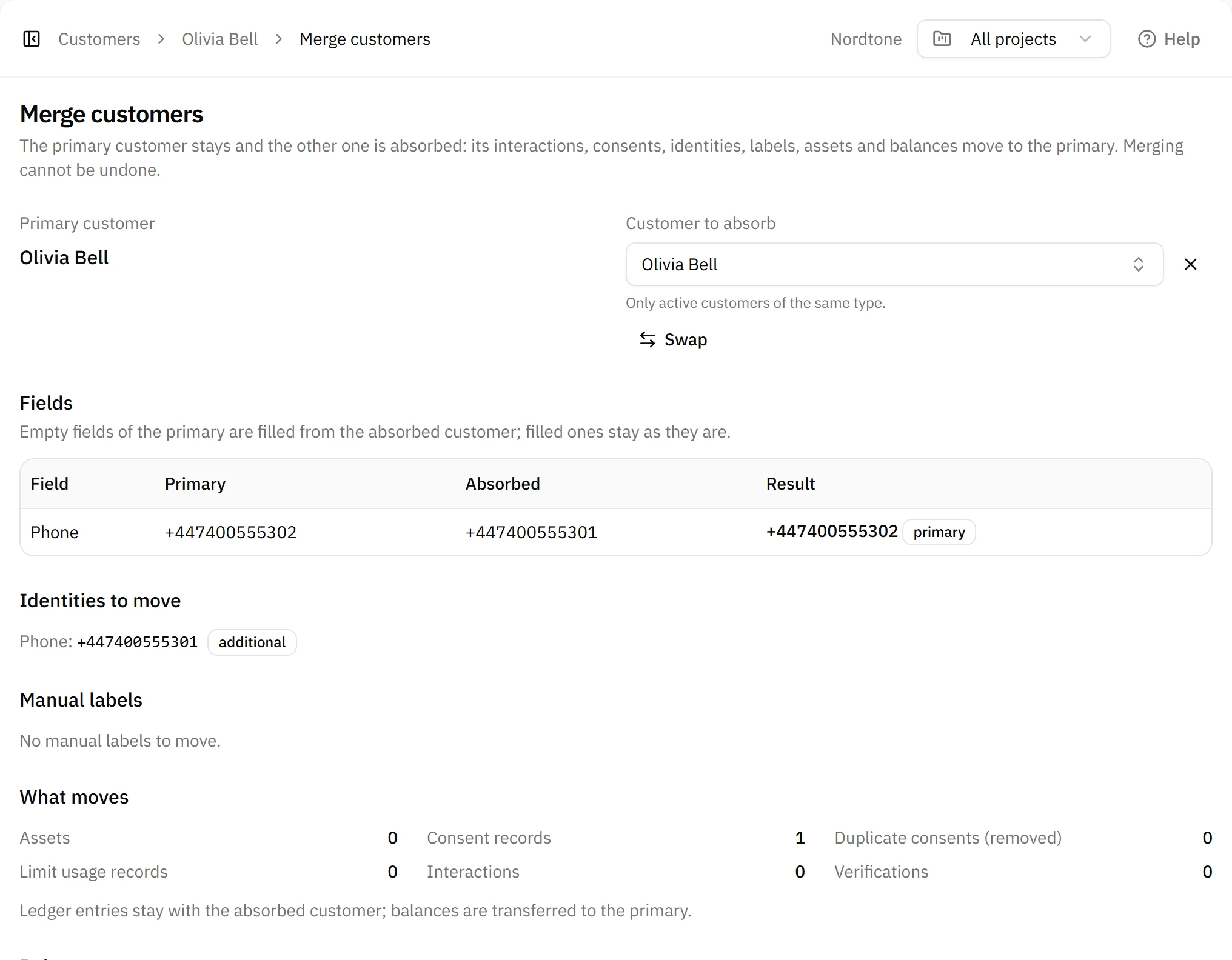
Fields
The table lists the fields where the two customers differ: the primary's value, the absorbed customer's value and the result. The rule is simple: empty fields of the primary are filled from the absorbed customer, filled ones stay as they are. A badge next to the value in the Result column tells whose value it is — the primary's or the absorbed customer's.
Fields hidden from your role or disabled are not in the table; only their count is shown below it.
Identities and labels
The Identities to move block lists phone numbers, documents and other identities of the absorbed customer that move to the primary. Identities that match the primary's ones are removed; their count is shown separately.
The Manual labels block lists labels set by hand. Each shows what will happen to it: it moves to the primary, replaces the primary's label (when the absorbed one expires later), or the primary's label stays. Expired labels of the absorbed customer are removed. Rule labels are dropped: the rules re-evaluate them on the primary customer.
What moves
The What moves block shows how many records of the absorbed customer move to the primary: assets, consent records, interactions, verifications and limit usage records. Duplicate consents are removed. Interactions move from every project, not only the one selected in the header.
Balances
The Balances table shows, for each account, the primary's and the absorbed customer's balance before the merge and the primary's balance after it. For example, 1,200 points on the primary and 300 on the absorbed customer give 1,500 points. Ledger entries stay with the absorbed customer; only the balance is transferred to the primary.
Confirming
- Check the preview.
- Press Merge customers.
- In the confirmation window, press Merge.
After the merge, the primary customer's card opens. The absorbed customer's card stays, but read-only: its history is still there, while the data is now with the primary. In the customer list it has a status badge.
When a merge is refused
The CRM refuses and explains why if:
- the same customer is selected twice;
- one of the customers is not active or has already been merged into another one;
- the customers are of different types;
- an account balance would not fit the account after the merge.
The reason is shown right on the merge screen. If the selected customer has already been merged into another one, there is an Open the primary customer link next to it. The card of an absorbed customer has no Merge with… button.
Merging through the API
Apps merge duplicates the same way through the API: POST /customers/{id}/merge, where {id} is the
primary customer and the request body names the absorbed one. The API has no preview. After the merge, requests for the
absorbed customer's id are redirected to the primary.