
Docs
Agents
The agent registry — list, agent page, form, personal codes and code check, import and export.
The Agents section is the registry of employees and salespeople that the organization's own system sends to the CRM: promoters, supervisors, sales reps. Rules use the registry to recognise customers who are agents, and the till checks agents' personal codes.
Roles with the “Agents → View” permission can see the section. Roles with the “Agents → Create and edit” permission can create, edit and switch agents and their codes on and off.
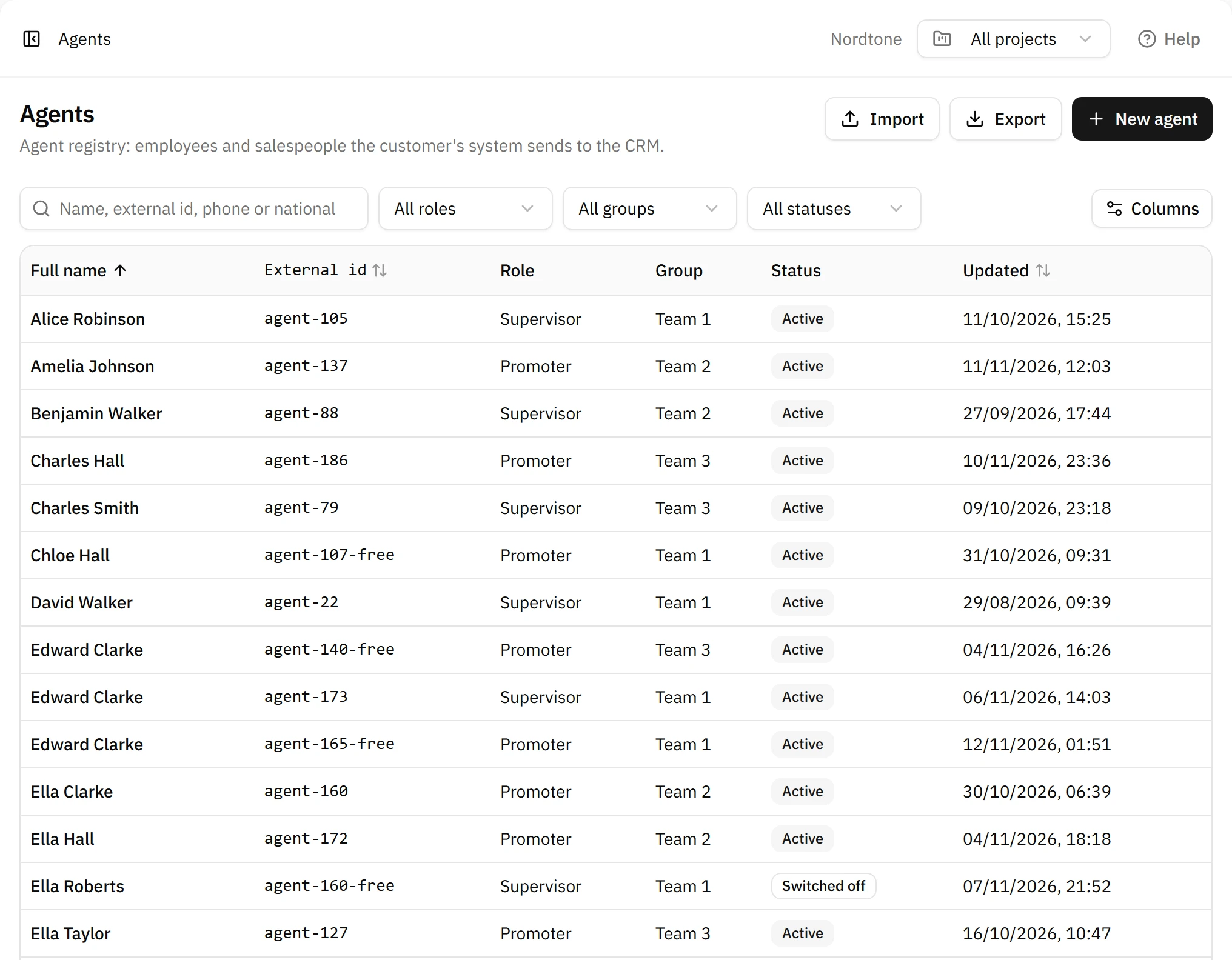
What's on the screen
The list columns are full name, external id, role, group, status (“Active” or “Switched off”) and the update date. A row opens the agent page. You can sort by full name, external id and update date.
Search and filters
The search box looks up full name, external id, phone or national id. Filters narrow the list by role, group (including “No group”) and status. Filters and sorting are kept in the page address.
Agent page and form
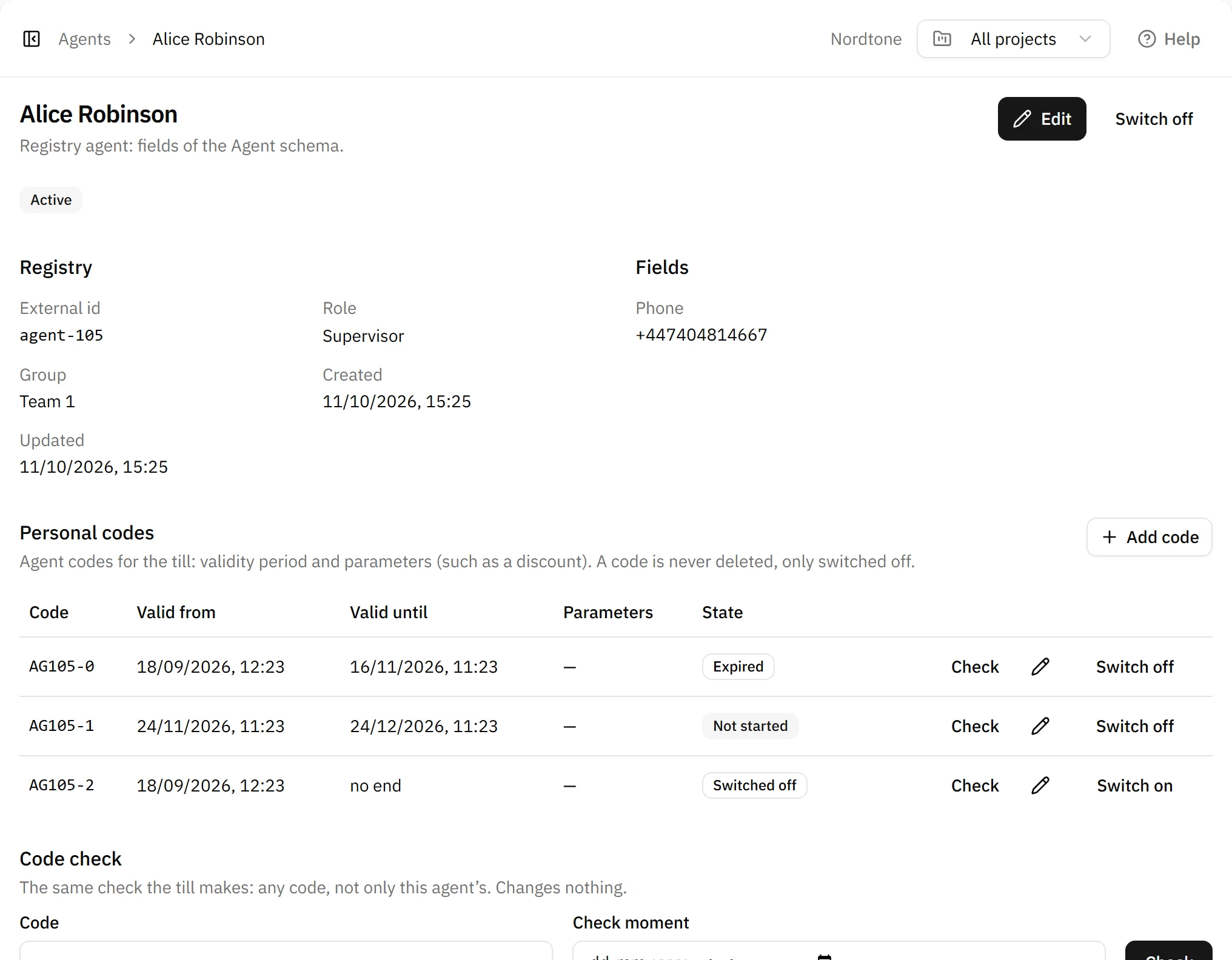
The page shows the agent's status and two blocks. Registry: external id, role, group, creation and update dates. Fields: the Agent schema fields visible to your role — a phone, for example. Below are the agent's personal codes and the code check.
The Edit and Switch off buttons (or Switch on for a switched-off agent) are shown to roles with the “Agents → Create and edit” permission.
- In the list, press New agent.
- Enter the External id — the one the organization's system knows the agent by: up to 64 characters, no spaces or “/”.
- Fill in the Full name and pick the Role.
- Optionally enter a Group — free text such as “Team 3” — and the schema fields.
- Press Create agent. The agent page opens.
The edit form has the same fields except the external id, which never changes. Activity is switched with the page buttons, not the form. Agent roles are set up in Entity types, agent fields in Schema.
Personal codes
Agent codes are for the till: a code has a validity period and parameters — a discount, for example. The code table shows the code, the start and end of its period, parameters and state: “Valid”, “Not started”, “Expired”, “Switched off” or “Agent switched off”.
- On the agent page, press Add code.
- Enter the Code: up to 64 Latin letters, digits, “-” and “_”. Case does not matter, and the code cannot be changed later.
- Set Valid from and Valid until: empty means right away and no end.
- Optionally add parameters: a key, a type (text, number or yes/no) and a value.
- Press Add.
A code's period and parameters can be edited. A code is never deleted, only switched off: the till stops accepting it, and you can switch it on again.
Code check
The Code check block at the bottom of the page checks a code the same way the till does: any code of the organization, not only this agent's. Enter the code and, optionally, the Check moment (empty means now, no later than the current minute) and press Check. The answer shows the code state, its agent, period and parameters. The Check button in a code row checks that code straight away. The check changes nothing and is available to everyone who can see the section.
Import and export
The Import button opens the log of agent imports from XLSX or CSV. Agents are matched by external id, codes are not changed by an import, and agents missing from the file can be switched off. Everyone who can see the section sees the log; uploading a file and launching an import need the “Agents → Create and edit” permission. See Imports for details.
The Export button is shown to roles with the “Customers → Export to file” permission, because agents' names and fields are personal data. The file holds the whole registry, switched-off agents included, in the import format and with the columns your role can see; list filters are not applied and agent codes are not exported. The file appears in My exports.
Through the API
Agents usually come from the organization's own system through the API: it creates and edits an agent by external id and switches it off. The till checks an agent's personal code through the API too. Codes are issued in the admin panel.