
Docs
A decision table with a limit
How to set up a decision table with a per-customer campaign limit — definition, row, evaluation for a customer, an interaction type that references the row, and the rejection once the limit is used up.
By the end you will have a decision table that says whether a customer is entitled to something in a campaign and won't let them get it twice. The Nordtone example: in the “City tour” campaign a promoter hands a customer a starter kit — one per customer. The CRM won't hand the same customer a second kit: an interaction referencing a used-up row is rejected. Table definitions and types are set up by roles with the “Settings → All settings, users and roles” permission (only the system “Administrator” role), rows by roles with the “Decision table rows → Edit and import” permission.
What you need
- The “Settings → All settings, users and roles” permission.
- A campaigns catalog with the campaign you need — at Nordtone it is “Campaigns” with the “City tour” campaign of the “Field activations” project. The per-campaign limit is counted only by the campaigns catalog (Request parameters).
- For the over-limit rejection — an app that creates interactions through the API: an API
client with the
decisions:evaluateandinteractions:writepermissions and the “Field activations” project. Both requests pass the customer id: if the app does not store it and looks the customer up by phone, add thecustomers:readpermission.
Describe the table
- Open Settings → Table definitions and press New table.
- Enter
starter_kitin Code, and in Name enter “Starter kit” for English and «Стартовый набор» for Russian. - In the Request parameters block, press Add parameter and fill it in: Name —
campaign, Type — Catalog item, Catalog — “Campaigns”, Label — “Campaign”. - In Campaign parameter, pick
campaign. - In the Columns block, press Key column and fill it in: Code —
campaign, the list Parameter —campaign, the operator — equals, Label — “Campaign”. - In the Result schema block, enter
kitas the Field code of the ready-made field, set the type to String and tick Required. - In the Projects block, tick “Field activations”.
- Press Create table.
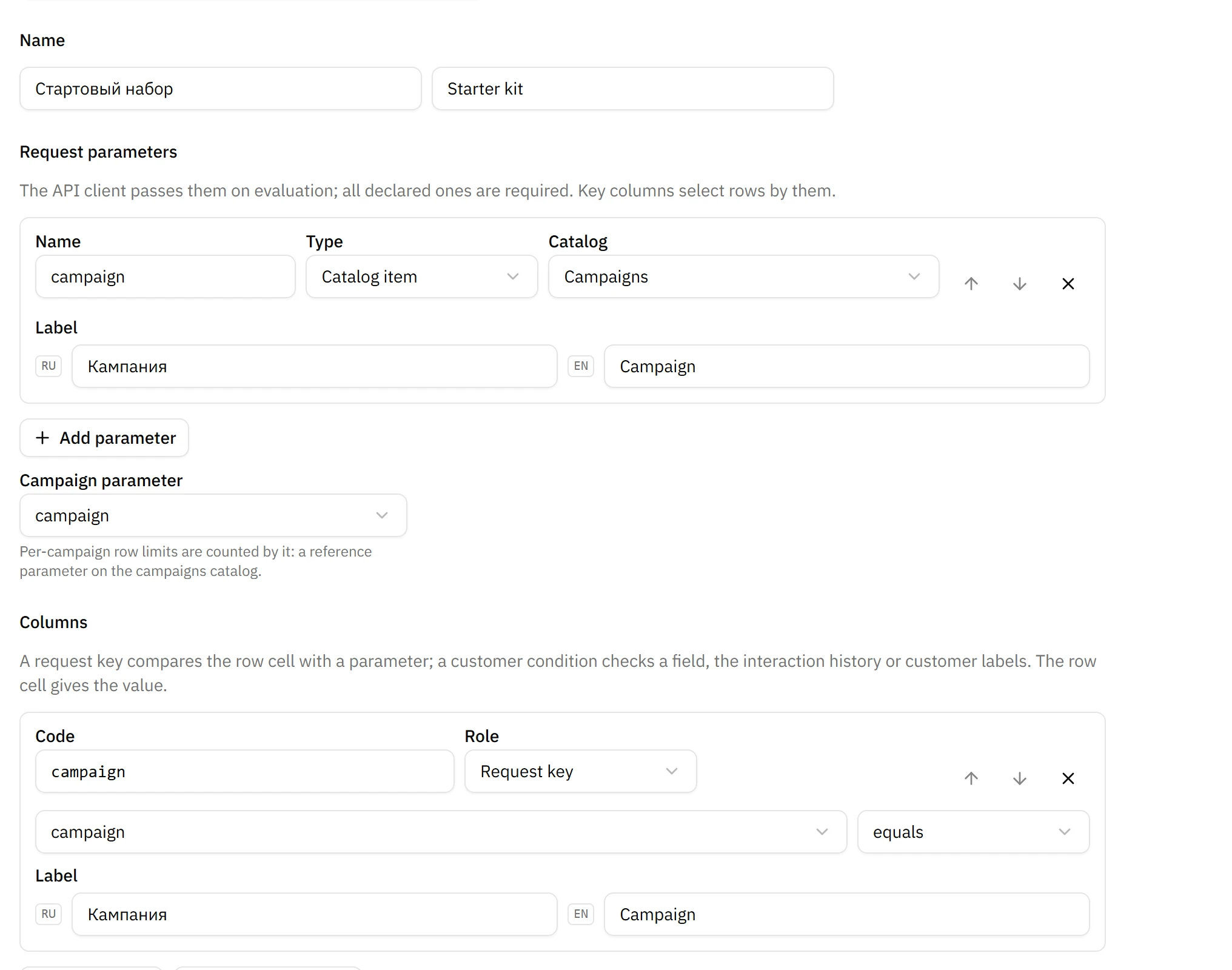
The table is created disabled and its definition opens. Press Enable in the header and confirm with Enable in the dialog. The form blocks are described under Table definitions.
Add a row with a limit
- Open Data → Decision tables, the “Starter kit” table, and press New row.
- Enter
city_tour_kitin Code and leave Priority at0. - In the “Campaign” cell, untick Any value and find the “City tour” campaign.
- In the Result block, enter “Headphone care kit” in the
kitfield. - In the Per-customer limits block, enter
1in Per campaign. Leave the other limits and the Validity period block empty. - Press Create row.
A per-campaign limit means: once per customer in each campaign the request names. There are also Per day and All time limits — see Per-customer limits.
Evaluate it for a customer
- On the table screen, press Evaluate.
- In the Customer field, find Anna Lange.
- Pick “City tour” in the “Campaign” parameter and press Evaluate in the panel.
“Matched: 1” lists the city_tour_kit row with its result and a “0 of 1 used” counter. An evaluation records nothing
and doesn't use the limit — only an interaction referencing the row does.
Link the row to an interaction
For handing out a kit to use up the limit, you need an interaction type that references the table's rows.
- Open Settings → Entity types, the Interaction types tab, and press New type.
- Enter
kit_handoverin Code, and in Label enter “Starter kit handover” for English and «Выдача стартового набора» for Russian. - In the Projects block, tick “Field activations” — the type's projects must be within the table's projects.
- In the Decision table line block, pick “Starter kit” in Decision table.
- In the Parameter sources block, pick Campaign for the “Campaign” parameter — the interaction's own campaign.
- Tick Decision line required: an interaction of this type won't be created without a line reference.
- Press Create type.
The other type settings are described under Entity types.
Rejection over the limit
The promoter app records the handover through the API:
- it evaluates the table for the customer —
POST /decision-tables/starter_kit/evaluatewith thefieldproject andcampaign=city_tour— and takes theidof the matched row; - it creates a
kit_handoverinteraction in thefieldproject with thecity_tourcampaign and that id indecision_line_id.
The first such interaction goes through and uses up the row's limit. The API rejects a second one for the same customer
in the same campaign with status 422 and the LIMIT_REACHED reason: the interaction isn't recorded. Send each create
request with its own Idempotency-Key header: a request with a reused key would get the first response back.
Check the result
- Evaluate Anna Lange in the “City tour” campaign again: the
city_tour_kitrow is now under “Rejected” with the “Limit reached” reason and a “1 of 1 used” counter (Evaluate for a customer). - In Data → API log, find the rejected request by the
interactionspath and the “4xx — client error” filter: the response carriesLIMIT_REACHEDand the used-up limit (Search and filters). - The customer card's Interactions tab has one “Starter kit handover”.
What's next
- Decision tables — uploading rows from a file when there are many campaigns; see also the Import guide.
- Points — a table that drives points for an interaction.
- Table definitions — condition columns: age, interaction history or customer labels, such as the label from the A rule that sets a label guide.