
Docs
My exports
Files you have exported from CRM lists and sections — status, retention and download.
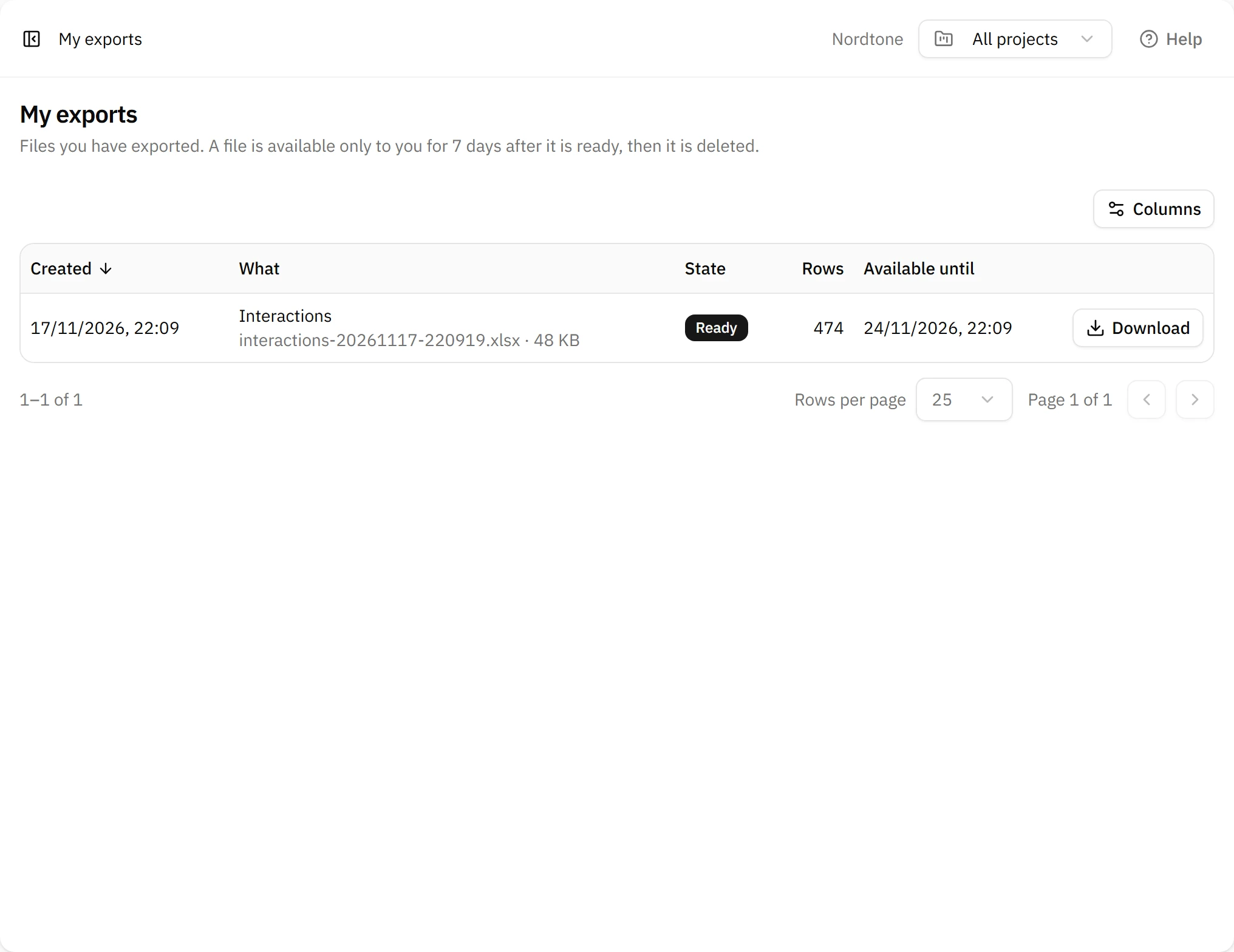
My exports is the page with the files you have exported yourself. It opens from the user menu and is available to every admin panel user. Other people's exports are not shown here, and nobody but you can see your files.
Where exports come from
An export is started with a button on a section page. The file is built in the background, and you are taken straight to this page.
| What is exported | Where the button is | Who sees it |
|---|---|---|
| Customers | Export above the customer list | “Customers → Export to file” |
| Interactions | Export above the interaction list | “Customers → Export to file” |
| Decision table rows | Export on the decision table page | “Decision table rows → View” |
| Catalog | Export on the catalog page | “Catalogs → View” |
| Agents | Export above the agent registry | “Customers → Export to file” |
Customer and interaction lists are exported with the current filters and sorting. A catalog and the agent registry are exported whole, inactive records included, in the import format — you can edit such a file and load it back through import. Decision table rows are exported as of now or as of a moment in the past you specify.
The file contains only the columns your role can see. The format is Excel (XLSX) or CSV.
What's on the screen
The table shows when the export was created, what was exported with the file name and size, the state, the number of rows and until when the file is available. Newest exports come first. A ready export has a Download button.
While an export is queued or running, the page refreshes on its own — no need to reload it.
States
| State | Meaning |
|---|---|
| Queued | the export waits for its turn |
| Exporting | the file is being built |
| Ready | the file can be downloaded |
| Failed | the export did not succeed; the reason is shown below it |
| Interrupted | the job did not finish — run the export again |
| Deleted after expiry | the file's retention period is over and it was deleted |
Retention and limit
A ready file is available for 7 days (a CRM setting defines the period), then it is deleted. The exact period is shown under the page title, and the deletion moment of each file is in the “Available until” column. Need the file again? Run the export once more.
You can have at most three exports queued or running at the same time (by default). When the limit is reached, the export window asks you to wait until one of them finishes.
Export log
Roles with the “Settings → All settings, users and roles” permission see every export of the organization — who exported what, when and with which filter — in the export log of the Settings section. Files cannot be downloaded there: only the author gets the file, on this page.